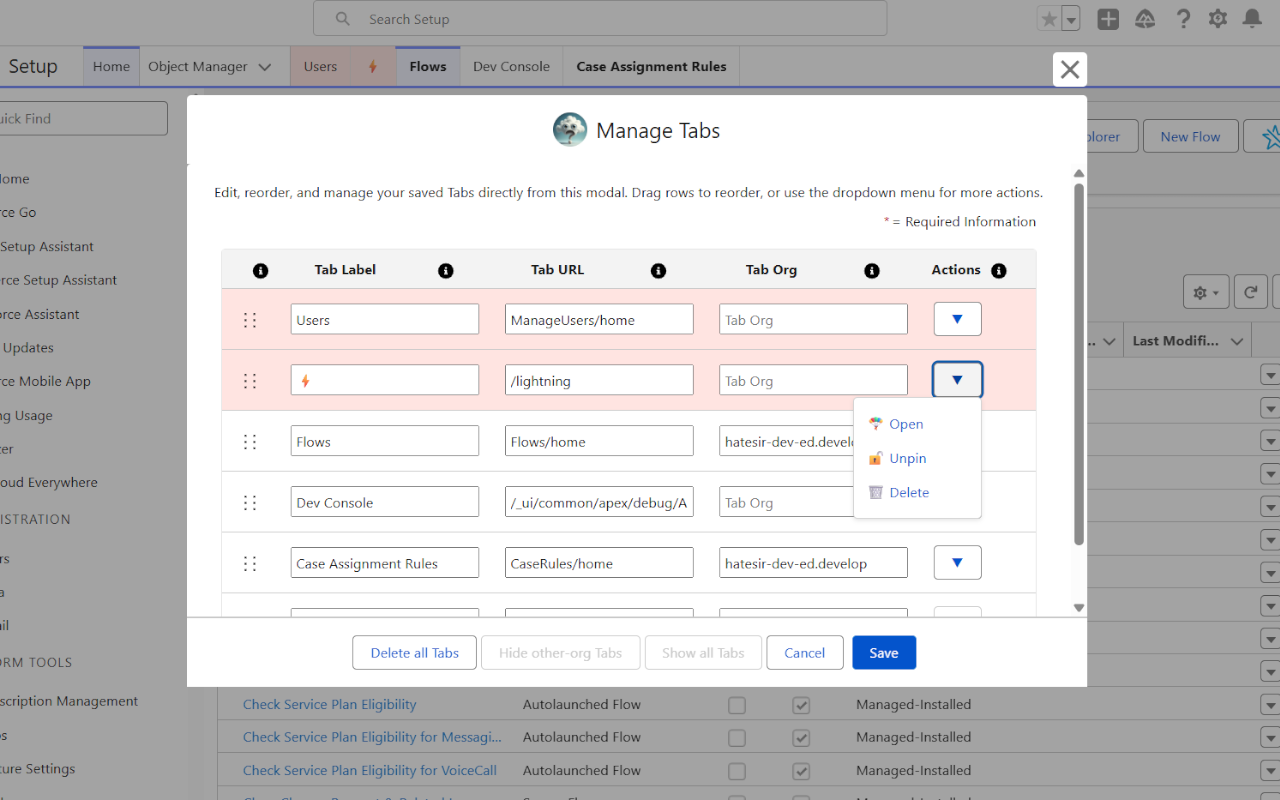
Manage tabs full screen
Add, remove, sort, pin, and update Setup tabs inside a wider Salesforce modal.
Read wiki page Again, Why Salesforce
Browser extension for Salesforce Setup
Create, pin, style, import, export, and move custom Salesforce Setup tabs across orgs without fighting browser history or Setup navigation.
Key features
Add, remove, sort, pin, and update Setup tabs inside a wider Salesforce modal.
Read wiki pageKeep tabs global or bind them to one Salesforce org profile when URLs should stay separate.
Read wiki pageSave, remove, update, import, export, and open tabs in another org from shortcuts.
Read wiki pageRight-click pages or tabs to move, pin, remove, update, or open current Setup page elsewhere.
Read wiki pageWhy should I use it?
Salesforce Setup work often means returning to the same pages across several orgs, copying setup URLs, and remembering which tabs matter for each project.
Again, Why Salesforce keeps those Setup routes close, organized, styled, and portable without sending data elsewhere.
How it works
Use matching browser store link, or latest GitHub release when store install does not apply.
Go to your Salesforce Setup, where custom tabs should appear.
Click the extension icon and allow access when your browser asks it, then save your first Setup tab.
About Again, Why Salesforce
Again, Why Salesforce is maintained by Astisme and built for daily Salesforce Setup work across Chrome, Edge, Firefox, and Safari.
Privacy
Core data stays in browser storage. Optional downloads and cookies permissions are requested only when related feature flow needs them.
Privacy policy